
 FR FR |
About us | Home | User agreement | Link to us |
How to type Cyrillic letters in Win 95/98
Despite wide availability of latest Windows versions such as Windows Vista and Windows 7, some people might still be using Windows 95/98. Unless you have the Russian version of Windows 95/98 you will need to perform some additional setup to type Russian letters. Read these simple instructions to learn how.
Here's How:
- Click on Start menu.
- Open Settings - Control Panel.
- Double click Keyboard.
- Single click Language tab.
- Check "Enable indicator on taskbar".
- Single click Add.
- Pick Russian language.
- Single click OK.
- Single click OK on the "Keyboard Properties" screen.
- If your computer prompts you for original Windows disk, insert it and OK the Windows prompt.
- If you do not have the disk, download Lang.exe, put it into some temporary folder and double click on it to self-extract. Return to "Add/Remove Programs" menu. Use "Have disk" and "Browse" buttons to point to a folder where you extracted Lang.exe. Then click OK to start installation.
- Switch between your default layout and the Russian layout by simultaneously pressing left ALT and SHIFT.
Tips:
- An indicator on the taskbar shows what keyboard you are in at the moment.
- You may assign different keys to switch between layouts.
Got questions?
Ask them in the Russian Questions and Answers — a place for students, teachers and native Russian speakers to discuss Russian grammar, vocabulary, pronunciation, and other aspects of the Russian language.
Copyright 2001-2026 MasterRussian.com | Privacy Policy | Contact Us
 Russian Lessons
- Russian alphabet
- Names of letters
- Russian Q&A new
- Pronunciation: Cons.
- Pronunciation: Vowels
- Noun Gender/Number
- Cases of Nouns
- Russian Greetings
- Personal Pronouns
- Learning Russian
- 1000 Common Words
- 500 Russian Verbs
- Top Russian Nouns
- » All lessons
- » Guest lessons
Browse Topics
- Start learning Russian
- Forum
- Bookstore
- Dictionaries
- Russian - basic
- Russian - adv
- Pronunciation
- Russian Blog new
- Reading
- Test & quizzes
- Translation
- Verbs
- Verb Conjugations
- Russian numbers
- Russian Tests new
- Vocabulary
- Writing
- Folk music
- Fun stuff
- Leo Tolstoy
- Learner's lore
- Literature
- Personal blogs
- Picture Dictionary new
- Proverbs
- Publications
- Radio & TV
- Russian culture
- Schools in Russia
- Russian Words
- Russian names
- Software
- Russian Words iPhone
Clicks the "Like" button below to get daily updates on Facebook!
Click "Add to circles" to learn Russian on Google+

Search MasterRussian

English » Russian dictionary

WORD OF THE DAY
 RSS
|
iGoogle
|
My Yahoo!
RSS
|
iGoogle
|
My Yahoo!
Meaning: (adj) entire, whole, (pron) all, everything, (particle) only, in all
Pronunciation: [vyehs']
Learn Russian words! »
TODAY'S STREET SIGN
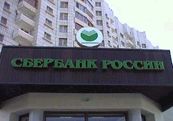
Russian: Сбербанк России
English: Sberbank of Russia
FOLLOW US ON TWITTER

MasterRussian on Twitter